

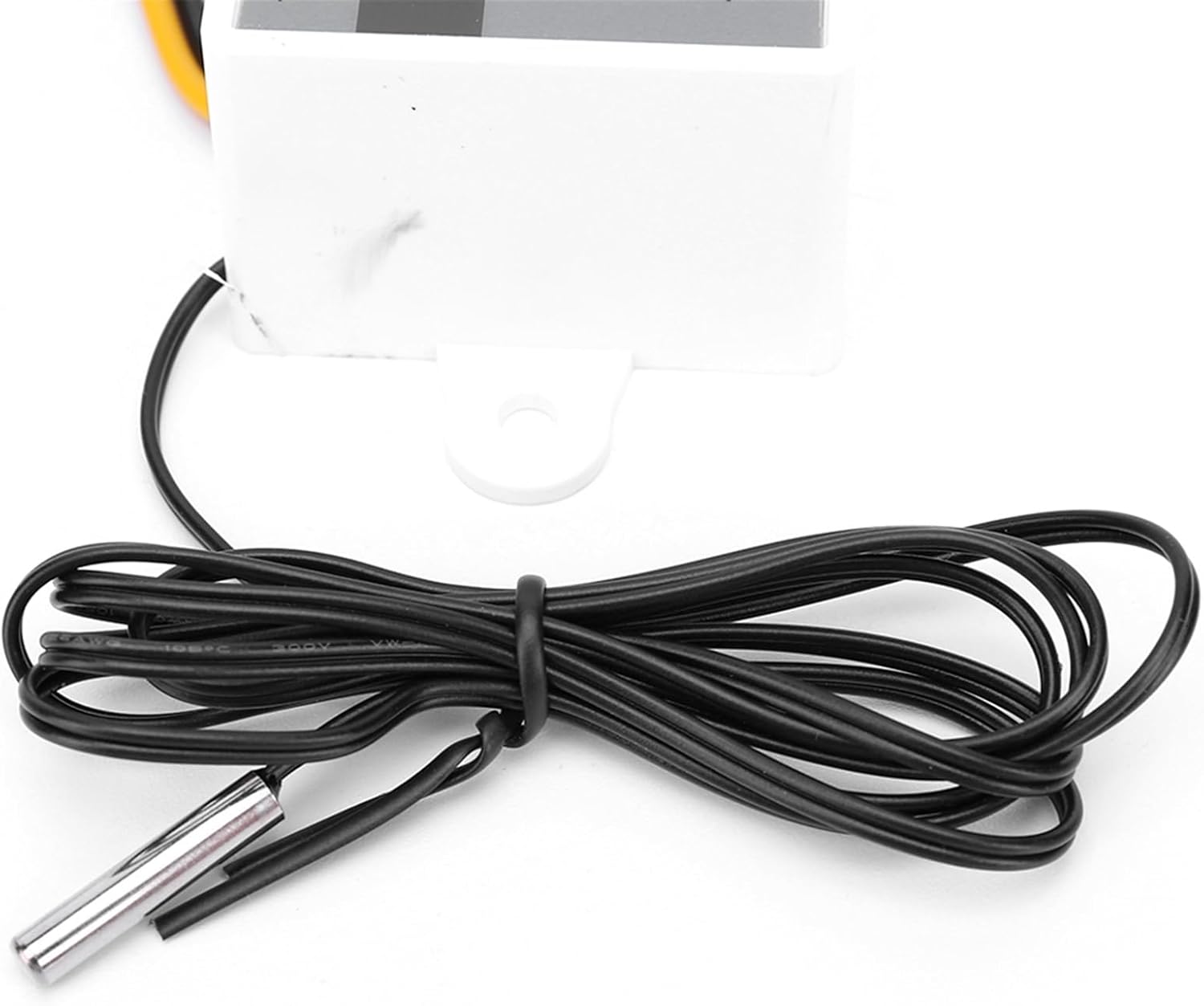
Digital Temperature Controller XH-W3001 Thermostat Control Switch 12V/24V/110-220V/220V Microcomputer Temperature Controller(110V 220V 1500W)
Product details
| Management number | 211078738 | Release Date | 2026/04/04 | List Price | $12.60 | Model Number | 211078738 | ||
|---|---|---|---|---|---|---|---|---|---|
| Category | |||||||||
Thermostat ControllersSpecification:Power supply voltage: 12V/24V/110-220V/220V (resistance capacitance voltage)Temperature control range: -50-110 degreesTemperature measurement range: -50-110 degreesTemperature control accuracy: 0.1 degreesLoad power: 120/240/1500WMeasurement input: NTG10K waterproof probe L=1 meterOutput type: direct outputOutput capacity: up to 10AInstallation hole spacing: 73mm (aperture 4mm)External dimensions: 60 * 45 * 31mm/2.36 * 1.77 * 1.22inchPackaging weight: 47gOperating instructionsSet startup temperature:Press the up button once to display the startup temperature. Press and hold the up button for about 3 seconds, and the startup temperature number will flash. The desired temperature value can be set through the up and down buttonsSet stop temperature: Press the down button once to display the stop temperature. Press and hold the button for about 3 seconds to flash the stop temperature number. The desired temperature value can be set through the up and down buttonsHow to reset: When the power is on, press and hold the up and down keys at the same time, the Nixie tube displays 888, and then automatically jumps to the detection temperature, that is, reset.Heating mode setting method<;stop temperature (the program automatically determines that the working mode is heating mode)Setting method:1. Long press the up/down button, the startup temperature flashes, and set the startup temperature value through the up/down buttons2. Long press the down button to stop the temperature flashing, and set the stop temperature value through the up and down buttonsUsage case: Control the water heater, stop heating at 65 , and start heating again when the temperature drops back to 50 ° C. How to set it?<;stopping temperatureStep 2: Long press the up/down button to flash the startup temperature. Use the up/down buttons to set the startup temperature to 50 ° CStep 3: Long press the down button to stop the temperature flashing. Use the up and down buttons to set the stop temperature to 65 ° C, and the setting is complete!Cooling mode setting methodSetting essentials: Start temperature>Stop temperature (the program automatically determines that the working mode is refrigeration mode)Setting method1. Long press the up/down button, the startup temperature flashes, and set the startup temperature value through the up/down buttons2. Long press and hold the down button to stop the temperature flashing, and set the stop temperature value through the up and down buttonsUse Case:Control the breeding farm, stop ventilation at 26 ° C, and restart refrigeration when the temperature rises to 28 ° C. How to set it?Step 1: Determine the working mode as refrigeration mode, start temperature>stop temperatureStep 2: Long press the up/down button to flash the startup temperature. Use the up/down buttons to set the startup temperature to 28 ° CStep 3: Long press the down button to stop the temperature flashing. Use the up and down buttons to set the stop temperature to 26 ° C, and the setting is completeReminder:When setting the heating mode, if the set temperature value is accidentally reversed, the output indicator light will not light up and the load will not work. If the above situation occurs after setting, you can check if the set temperature value is reversedNote:Due to the different monitor and light effect, the actual color of the item might be slightly different from the color showed on the pictures. Thank you!Please allow 1-2cm measuring deviation due to manual measurement. Specification:Power supply voltage: 12V/24V/110-220V/220V (resistance capacitance voltage)Temperature control range: -50-110 degreesTemperature measurement range: -50-110 degreesTemperature control accuracy: 0.1 degreesLoad power: 120/240/1500WMeasurement input: NTG10K waterproof probe L=1 meterOutput type: direct outputOutput capacity: up to 10AInstallation hole spacing: 73mm (aperture 4mm)External dimensions: 60 * 45 * 31mm/2.36 * 1.77 * 1.22inchPackaging weight: 47gOperating instructionsSet startup temperature:Press the up button once to display the startup temperature. Press and hold the up button for about 3 seconds, and the startup temperature number will flash. The desired temperature value can be set through the up and down buttonsSet stop temperature: Press the down button once to display the stop temperature. Press and hold the button for about 3 seconds to flash the stop temperature number. The desired temperature value can be set through the up and down buttonsHow to reset: When the power is on, press and hold the up and down keys at the same time, the Nixie tube displays 888, and then automatically jumps to the detection temperature, that is, reset.Heating mode setting method<;stop temperature (the program automatically determines that the working mode is heating mode)Setting method:1. Long press the up/down button, the startup temperature flashes, and set the startup temperature value through the up/down buttons2. Long press the down button to stop the temperature flashing, and set the stop temperature value through the up and down buttonsUsage case: Control the water heater, stop heating at 65 , and start heating again when the temperature drops back to 50 ° C. How to set it?<;stopping temperatureStep 2: Long press the up/down button to flash the startup temperature. Use the up/down buttons to set the startup temperature to 50 ° CStep 3: Long press the down button to stop the temperature flashing. Use the up and down buttons to set the stop temperature to 65 ° C, and the setting is complete!Cooling mode setting methodSetting essentials: Start temperature>Stop temperature (the program automatically determines that the working mode is refrigeration mode)Setting method1. Long press the up/down button, the startup temperature flashes, and set the startup temperature value through the up/down buttons2. Long press and hold the down button to stop the temperature flashing, and set the stop temperature value through the up and down buttonsUse Case:Control the breeding farm, stop ventilation at 26 ° C, and restart refrigeration when the temperature rises to 28 ° C. How to set it?Step 1: Determine the working mode as refrigeration mode, start temperature>stop temperatureStep 2: Long press the up/down button to flash the startup temperature. Use the up/down buttons to set the startup temperature to 28 ° CStep 3: Long press the down button to stop the temperature flashing. Use the up and down buttons to set the stop temperature to 26 ° C, and the setting is completeReminder:When setting the heating mode, if the set temperature value is accidentally reversed, the output indicator light will not light up and the load will not work. If the above situation occurs after setting, you can check if the set temperature value is reversedNote:Due to the different monitor and light effect, the actual color of the item might be slightly different from the color showed on the pictures. Thank you!Please allow 1-2cm measuring deviation due to manual measurement. Specification:Power supply voltage: 12V/24V/110-220V/220V (resistance capacitance voltage)Temperature control range: -50-110 degreesTemperature measurement range: -50-110 degreesTemperature control accuracy: 0.1 degreesLoad power: 120/240/1500WMeasurement input: NTG10K waterproof probe L=1 meterOutput type: direct outputOutput capacity: up to 10AInstallation hole spacing: 73mm (aperture 4mm)External dimensions: 60 * 45 * 31mm/2.36 * 1.77 * 1.22inchPackaging weight: 47gOperating instructionsSet startup temperature:Press the up button once to display the startup temperature. Press and hold the up button for about 3 seconds, and the startup temperature number will flash. The desired temperature value can be set through the up and down buttonsSet stop temperature: Press the down button once to display the stop temperature. Press and hold the button for about 3 seconds to flash the stop temperature number. The desired temperature value can be set through the up and down buttonsHow to reset: When the power is on, press and hold the up and down keys at the same time, the Nixie tube displays 888, and then automatically jumps to the detection temperature, that is, reset.Heating mode setting method<;stop temperature (the program automatically determines that the working mode is heating mode)Setting method:1. Long press the up/down button, the startup temperature flashes, and set the startup temperature value through the up/down buttons2. Long press the down button to stop the temperature flashing, and set the stop temperature value through the up and down buttonsUsage case: Control the water heater, stop heating at 65 , and start heating again when the temperature drops back to 50 ° C. How to set it?<;stopping temperatureStep 2: Long press the up/down button to flash the startup temperature. Use the up/down buttons to set the startup temperature to 50 ° CStep 3: Long press the down button to stop the temperature flashing. Use the up and down buttons to set the stop temperature to 65 ° C, and the setting is complete!Cooling mode setting methodSetting essentials: Start temperature>Stop temperature (the program automatically determines that the working mode is refrigeration mode)Setting method1. Long press the up/down button, the startup temperature flashes, and set the startup temperature value through the up/down buttons2. Long press and hold the down button to stop the temperature flashing, and set the stop temperature value through the up and down buttonsUse Case:Control the breeding farm, stop ventilation at 26 ° C, and restart refrigeration when the temperature rises to 28 ° C. How to set it?Step 1: Determine the working mode as refrigeration mode, start temperature>stop temperatureStep 2: Long press the up/down button to flash the startup temperature. Use the up/down buttons to set the startup temperature to 28 ° CStep 3: Long press the down button to stop the temperature flashing. Use the up and down buttons to set the stop temperature to 26 ° C, and the setting is completeReminder:When setting the heating mode, if the set temperature value is accidentally reversed, the output indicator light will not light up and the load will not work. If the above situation occurs after setting, you can check if the set temperature value is reversedNote:Due to the different monitor and light effect, the actual color of the item might be slightly different from the color showed on the pictures. Thank you!Please allow 1-2cm measuring deviation due to manual measurement. Specification:Power supply voltage: 12V/24V/110-220V/220V (resistance capacitance voltage)Temperature control range: -50-110 degreesTemperature measurement range: -50-110 degreesTemperature control accuracy: 0.1 degreesLoad power: 120/240/1500WMeasurement input: NTG10K waterproof probe L=1 meterOutput type: direct outputOutput capacity: up to 10AInstallation hole spacing: 73mm (aperture 4mm)External dimensions: 60 * 45 * 31mm/2.36 * 1.77 * 1.22inchPackaging weight: 47gOperating instructionsSet startup temperature:Press the up button once to display the startup temperature. Press and hold the up button for about 3 seconds, and the startup temperature number will flash. The desired temperature value can be set through the up and down buttonsSet stop temperature: Press the down button once to display the stop temperature. Press and hold the button for about 3 seconds to flash the stop temperature number. The desired temperature value can be set through the up and down buttonsHow to reset: When the power is on, press and hold the up and down keys at the same time, the Nixie tube displays 888, and then automatically jumps to the detection temperature, that is, reset.Heating mode setting method<;stop temperature (the program automatically determines that the working mode is heating mode)Setting method:1. Long press the up/down button, the startup temperature flashes, and set the startup temperature value through the up/down buttons2. Long press the down button to stop the temperature flashing, and set the stop temperature value through the up and down buttonsUsage case: Control the water heater, stop heating at 65 , and start heating again when the temperature drops back to 50 ° C. How to set it?<;stopping temperatureStep 2: Long press the up/down button to flash the startup temperature. Use the up/down buttons to set the startup temperature to 50 ° CStep 3: Long press the down button to stop the temperature flashing. Use the up and down buttons to set the stop temperature to 65 ° C, and the setting is complete!Cooling mode setting methodSetting essentials: Start temperature>Stop temperature (the program automatically determines that the working mode is refrigeration mode)Setting method1. Long press the up/down button, the startup temperature flashes, and set the startup temperature value through the up/down buttons2. Long press and hold the down button to stop the temperature flashing, and set the stop temperature value through the up and down buttonsUse Case:Control the breeding farm, stop ventilation at 26 ° C, and restart refrigeration when the temperature rises to 28 ° C. How to set it?Step 1: Determine the working mode as refrigeration mode, start temperature>stop temperatureStep 2: Long press the up/down button to flash the startup temperature. Use the up/down buttons to set the startup temperature to 28 ° CStep 3: Long press the down button to stop the temperature flashing. Use the up and down buttons to set the stop temperature to 26 ° C, and the setting is completeReminder:When setting the heating mode, if the set temperature value is accidentally reversed, the output indicator light will not light up and the load will not work. If the above situation occurs after setting, you can check if the set temperature value is reversedNote:Due to the different monitor and light effect, the actual color of the item might be slightly different from the color showed on the pictures. Thank you!Please allow 1-2cm measuring deviation due to manual measurement. Specification:Power supply voltage: 12V/24V/110-220V/220V (resistance capacitance voltage)Temperature control range: -50-110 degreesTemperature measurement range: -50-110 degreesTemperature control accuracy: 0.1 degreesLoad power: 120/240/1500WMeasurement input: NTG10K waterproof probe L=1 meterOutput type: direct outputOutput capacity: up to 10AInstallation hole spacing: 73mm (aperture 4mm)External dimensions: 60 * 45 * 31mm/2.36 * 1.77 * 1.22inchPackaging weight: 47gOperating instructionsSet startup temperature:Press the up button once to display the startup temperature. Press and hold the up button for about 3 seconds, and the startup temperature number will flash. The desired temperature value can be set through the up and down buttonsSet stop temperature: Press the down button once to display the stop temperature. Press and hold the button for about 3 seconds to flash the stop temperature number. The desired temperature value can be set through the up and down buttonsHow to reset: When the power is on, press and hold the up and down keys at the same time, the Nixie tube displays 888, and then automatically jumps to the detection temperature, that is, reset.Heating mode setting method<;stop temperature (the program automatically determines that the working mode is heating mode)Setting method:1. Long press the up/down button, the startup temperature flashes, and set the startup temperature value through the up/down buttons2. Long press the down button to stop the temperature flashing, and set the stop temperature value through the up and down buttonsUsage case: Control the water heater, stop heating at 65 , and start heating again when the temperature drops back to 50 ° C. How to set it?<;stopping temperatureStep 2: Long press the up/down button to flash the startup temperature. Use the up/down buttons to set the startup temperature to 50 ° CStep 3: Long press the down button to stop the temperature flashing. Use the up and down buttons to set the stop temperature to 65 ° C, and the setting is complete!Cooling mode setting methodSetting essentials: Start temperature>Stop temperature (the program automatically determines that the working mode is refrigeration mode)Setting method1. Long press the up/down button, the startup temperature flashes, and set the startup temperature value through the up/down buttons2. Long press and hold the down button to stop the temperature flashing, and set the stop temperature value through the up and down buttonsUse Case:Control the breeding farm, stop ventilation at 26 ° C, and restart refrigeration when the temperature rises to 28 ° C. How to set it?Step 1: Determine the working mode as refrigeration mode, start temperature>stop temperatureStep 2: Long press the up/down button to flash the startup temperature. Use the up/down buttons to set the startup temperature to 28 ° CStep 3: Long press the down button to stop the temperature flashing. Use the up and down buttons to set the stop temperature to 26 ° C, and the setting is completeReminder:When setting the heating mode, if the set temperature value is accidentally reversed, the output indicator light will not light up and the load will not work. If the above situation occurs after setting, you can check if the set temperature value is reversedNote:Due to the different monitor and light effect, the actual color of the item might be slightly different from the color showed on the pictures. Thank you!Please allow 1-2cm measuring deviation due to manual measurement. 1 x Digital Temperature Controller
- Thermostat Controllers
- Digital Temperature Controller XH-W3001 Thermostat Control Switch 12V/24V/110-220V/220V Microcomputer Temperature Controller
| Color | 110v 220v 1500w |
|---|---|
| Brand Name | TDKAEU |
| Manufacturer | TDKAEU |
| Model Number | TDKAEU |


Bestseller ranking
Thermostat Controllers




Correction of product information
If you notice any omissions or errors in the product information on this page, please use the correction request form below.
Correction Request Form